
Restocking cleaning supplies efficiently is defined as maintaining continuous stock availability through integrated inventory tracking, automated purchasing, and organised storage. For cleaning businesses managing 10 or more crews, manual ordering wastes 3 to 6 hours per week and leaves operations exposed to costly stockouts. The fix is not simply buying more stock. It is connecting tools like Sortly, Amazon Business, and Slack into a single workflow that monitors consumption, triggers reorders, and confirms purchases without manual intervention. Done correctly, this approach saves between $500 and $2,000 monthly and typically pays for itself within the first billing cycle.
What tools do you need to restock cleaning supplies efficiently?
The foundation of any efficient cleaning supply ordering system is a clear separation between three functions: tracking what you have, purchasing what you need, and communicating with your team. Mixing these into one task is the most common reason restocking systems fail. Workflow specialists confirm that an orchestration layer connecting inventory, purchasing, and communication is not optional. It is the difference between a system that works and one that creates more admin than it solves.
Inventory tracking platforms
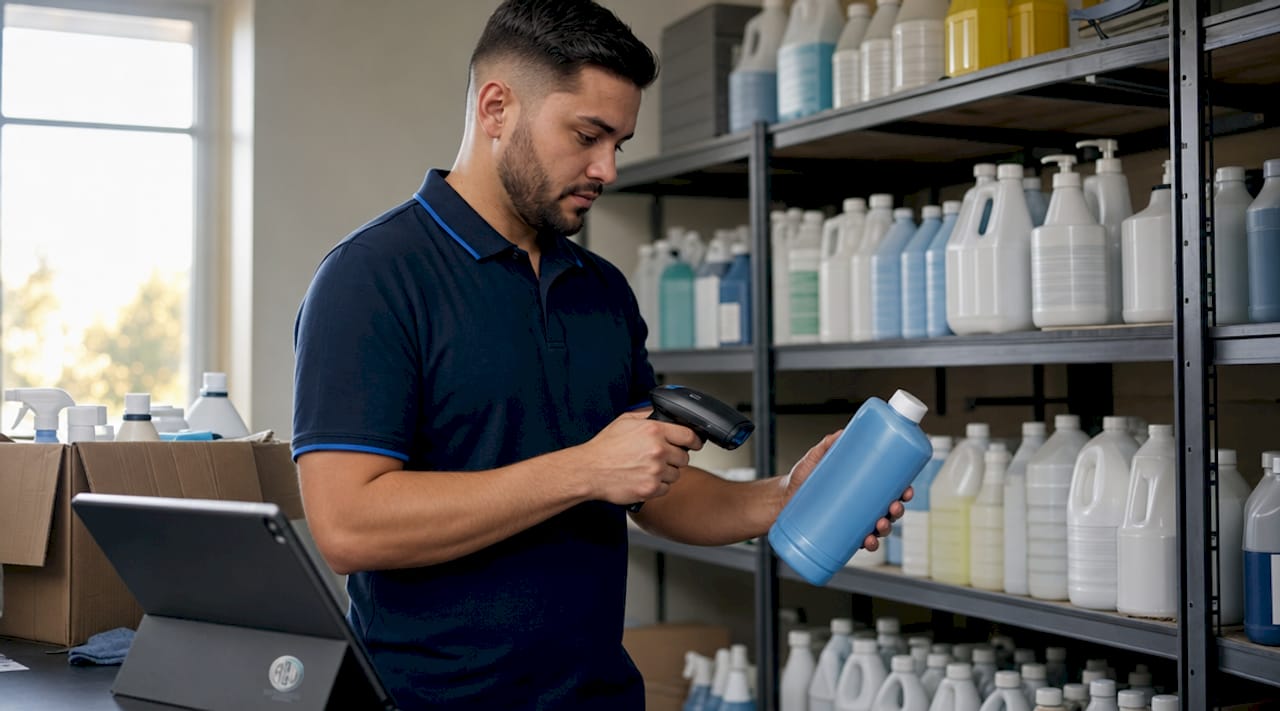
Sortly is the go-to platform for cleaning operations because it combines real-time stock visibility with barcode scanning and mobile access for field crews. Your team scans a product when they use it, and the system updates stock levels automatically. This removes the guesswork from knowing what is actually on the shelf versus what was ordered three weeks ago. For smaller operations, Google Sheets or Excel templates paired with AI agents can automate stock counting and flag reorder points without requiring a paid platform.
Purchasing portals and B2B platforms
Amazon Business is the most practical purchasing portal for Australian cleaning businesses because it offers negotiated pricing, approval workflows, and saved order lists. B2B eCommerce platforms like these empower janitorial suppliers to automate routine reordering, improve order accuracy, and reduce manual entry errors. Features such as quick SKU entry and saved supplier catalogues mean your team is not rebuilding purchase orders from scratch each week. For businesses with existing supplier relationships, most distributors now offer their own B2B portals with similar functionality.
Communication and orchestration tools
Slack or SMS-based alerts serve as the human checkpoint in an otherwise automated system. When stock drops below a reorder threshold, a notification fires to the operations manager for approval before the order is submitted. This keeps humans in the loop for high-value orders while routine, low-cost items process automatically. US Tech Automations is one example of an orchestration layer that connects Sortly, Amazon Business, and Slack into a single automated workflow purpose-built for cleaning companies.
Pro Tip: Start by automating your top five to eight highest-consumption items. These typically cover 70% of your supply costs and represent the greatest stockout risk. You do not need to automate everything on day one.
| Tool category | Recommended option | Primary function |
|---|---|---|
| Inventory tracking | Sortly | Real-time stock levels and barcode scanning |
| Purchasing portal | Amazon Business | Automated ordering with approval workflows |
| Communication | Slack or SMS | Reorder alerts and manager approvals |
| Orchestration | US Tech Automations | Connects all systems into one workflow |
How do you set up an automated restocking workflow?
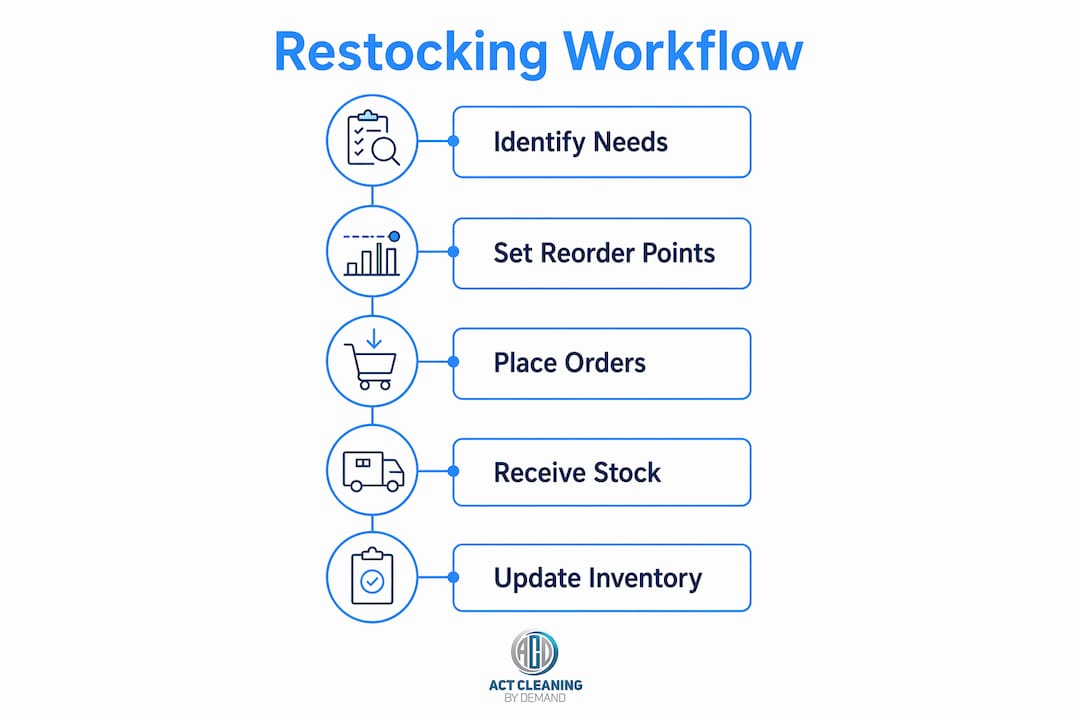
Building an automated restocking workflow requires five deliberate steps. Skipping any one of them creates gaps that force your team back into manual processes.
-
Calculate your reorder points. The formula is straightforward: multiply your average weekly consumption by your supplier lead time, then add a safety buffer of one to two weeks. Accurate reorder points require factoring in lead times and safety buffers, refined through consumption data from job completion logs. Run this calculation for every item you plan to automate, and revisit the numbers after 30 to 60 days of real data.
-
Map each inventory item to a supplier SKU or ASIN. Every product in your tracking system needs a direct link to its equivalent in your purchasing portal. This mapping is what allows the system to generate a purchase order automatically when stock drops. Include your preferred order quantity at this stage so the system does not over-order.
-
Configure low-stock triggers in your inventory platform. In Sortly, this means setting a minimum quantity for each item. When the recorded stock level hits that number, the platform fires a trigger event. If you are using a spreadsheet-based system, AI agents can monitor the sheet and send alerts when a cell value drops below a defined threshold.
-
Connect triggers to your purchasing portal via API or automation layer. For orders below a set dollar value, configure the system to submit the order automatically. For larger orders, route an approval request to Slack or email before the order is placed. This two-tier approach keeps costs controlled without adding unnecessary friction to routine restocking.
-
Test the full workflow before going live. Manually reduce a stock level in your tracking system and confirm that the trigger fires, the notification arrives, and the purchase order generates correctly. Fix any mapping errors before your team relies on the system for real orders.
Pro Tip: Refine your reorder point calculations using actual job completion data rather than estimates. After 60 days of tracking, your consumption figures will be precise enough to reduce your safety buffer and free up working capital.
What best practices reduce errors in cleaning supply restocking?
Physical organisation and data discipline are the two pillars of a restocking system that stays accurate over time. Technology cannot compensate for a storage room that nobody can navigate or a team that does not log usage consistently.
Decluttering expired or half-empty cleaning products and centralising storage significantly improves supply management efficiency. Remove any product that is past its use-by date, nearly empty, or no longer part of your standard kit. These items distort your inventory counts and create safety risks. An essentials cleaning kit typically covers 15 to 20 items costing between $150 and $300. Keeping your catalogue tight makes tracking far more reliable.
Centralise your main storage in one location and use portable caddies for the items crews need on every job. Portable caddies reduce the time your team spends searching for supplies and make it easier to spot when something is running low. Label every shelf and caddy clearly so any crew member can locate and log items without needing to ask.
"Efficiency in restocking starts with removing unnecessary stock and centralising supplies. Portable caddies and clear labelling significantly reduce crew time spent searching for items." — Decluttering tips for facility management
Train every staff member to log usage at the point of consumption, not at the end of the week. Delayed logging is the single biggest cause of inaccurate inventory data. If your team uses Sortly on mobile, scanning a barcode takes under five seconds and updates the system in real time. Review your reorder thresholds and consumption data monthly to catch any items where usage patterns have shifted.
For teams managing multiple properties, the guide on managing multiple cleaning crews covers how to organise and label supplies across different sites to reduce time wasted searching.
Manual, spreadsheet, or fully automated: which method suits your operation?
The right restocking method depends on your operation size, budget, and tolerance for manual admin. Each approach has a distinct cost and efficiency profile.
Manual tracking, where a team member physically counts stock and places orders by phone or email, is the default for most small cleaning businesses. The problem is that emergency supply runs cost 2 to 3 times more than planned purchases due to rush shipping and lost productivity. For operations with more than five crews, manual tracking becomes a liability rather than a cost-saving measure.
Spreadsheet-based tracking using Google Sheets or Excel improves visibility without requiring a software subscription. The common misconception is that spreadsheets are too manual for serious inventory management. Adding AI-powered agents transforms them into dynamic, predictive tools that automate notifications and draft restock lists. This hybrid approach is the most practical starting point for businesses not yet ready to invest in a full integration.
Full automation via platforms like Sortly connected to Amazon Business and Slack cuts stockout incidents by 60 to 80% and delivers measurable savings within the first month. The trade-off is setup time and a requirement for accurate consumption data before the system can run reliably.
| Method | Weekly admin time | Stockout risk | Upfront setup effort |
|---|---|---|---|
| Manual tracking | 3 to 6 hours | High | Minimal |
| Spreadsheet with AI agents | 1 to 2 hours | Medium | Low to moderate |
| Full automation (Sortly + Amazon Business) | Under 30 minutes | Low | Moderate to high |
Pro Tip: If you are transitioning from manual to automated, do not attempt to migrate your entire product catalogue at once. Start with your top five highest-cost items, validate the workflow, then expand incrementally over 90 days.
The most common pitfall when moving from manual to automated systems is poor data quality at the start. If your opening stock counts are inaccurate, every reorder point calculation will be wrong. Conduct a full physical count before you configure any triggers, and treat that count as the single source of truth for your new system.
Key takeaways
Automating cleaning supply restocking requires accurate consumption data, mapped supplier SKUs, and a connected workflow across inventory, purchasing, and communication tools.
| Point | Details |
|---|---|
| Automate high-consumption items first | Focus on your top five to eight items, which cover roughly 70% of supply costs and stockout risk. |
| Separate tracking from purchasing | Use distinct tools for inventory and ordering, connected by an orchestration layer to avoid errors. |
| Calculate reorder points with real data | Refine estimates using 30 to 60 days of actual job completion data for precise thresholds. |
| Declutter before you digitise | Remove expired and redundant stock before setting up any tracking system to keep data clean. |
| Match your method to your operation size | Spreadsheet-AI hybrids suit smaller teams; full automation pays off at 10 or more crews. |
Why restocking automation is a margin lever, not just an admin fix
From my experience working alongside cleaning operations of all sizes, the businesses that treat supply restocking as a back-office chore consistently leave money on the table. The ones that treat it as a margin lever operate differently. They know their consumption rates, they have mapped their top items to supplier SKUs, and they spend their time analysing trends rather than chasing stock.
The shift that automation creates is not just about saving hours. It changes what your operations manager focuses on. Instead of fielding calls about missing mop heads or making emergency runs to the hardware store, they are reviewing consumption data and identifying where product substitutions could reduce costs. That is a fundamentally different job, and it produces better outcomes for clients.
My honest advice is to resist the urge to build the perfect system from day one. I have seen businesses spend three months configuring a full integration only to abandon it because the data quality was not there to support it. Start with a spreadsheet and an AI agent. Get your consumption data clean. Then graduate to Sortly and Amazon Business once you trust the numbers. The technology is not the hard part. The discipline of logging usage accurately and reviewing thresholds monthly is where most operations either succeed or stall.
The businesses that get this right do not just reduce costs. They build a reputation for reliability because their crews always have what they need, when they need it. For a residential cleaning operation, that consistency is what converts one-off clients into long-term relationships.
— Deng
How ACT Cleaning by Demand supports supply-backed quality service
At ACT Cleaning by Demand, every service we deliver depends on having the right supplies available at the right time. Our custom cleaning packages are built around reliable supply management so that residential and commercial clients in Canberra receive consistent, high-quality results on every visit. Whether you need end-of-lease cleaning, regular office maintenance, or presale preparation, our team arrives fully equipped with eco-friendly products tailored to your property. If you want a cleaning service that takes supply reliability as seriously as the clean itself, contact ACT Cleaning by Demand for a personalised quote today.
FAQ
How often should I restock cleaning supplies?
Restock based on calculated reorder points rather than a fixed schedule. Multiply your average weekly consumption by your lead time and add a safety buffer to determine the right trigger level for each item.
What is the cheapest way to manage cleaning supply inventory?
A Google Sheets or Excel template combined with an AI agent is the lowest-cost starting point. This hybrid approach automates reorder alerts and drafts purchase lists without requiring a paid inventory platform.
How much can automation save on cleaning supply costs?
Automating inventory tracking and purchasing can save between $500 and $2,000 monthly for mid-sized operations by eliminating emergency runs and over-ordering. Emergency purchases cost two to three times more than planned orders.
Which items should I automate first?
Automate your top five to eight highest-consumption items first. These typically account for 70% of your total supply spend and carry the greatest stockout risk, delivering the fastest return on your setup effort.
How do I keep inventory data accurate with a large crew?
Train staff to log usage at the point of consumption using a mobile app like Sortly. Delayed or batch logging is the primary cause of inaccurate stock counts, which undermines every reorder calculation downstream.