
A cleaning business schedule is a structured system for organising recurring client visits, crew assignments, route sequences, and resource allocation into a single, repeatable operation. When you set up a cleaning business schedule correctly, you reduce wasted travel time, prevent double-bookings, and give clients the consistency they pay for. The industry term for this discipline is service scheduling, and it covers everything from frequency rules and geographic zoning to automated reminders and cancellation policies. Done well, it transforms a reactive, phone-call-driven operation into a self-managing machine that scales without proportional increases in your workload.
What are the essential components of your cleaning schedule?
A workable cleaning schedule starts with precise client data captured at the point of onboarding. For each client, record the full address, access method (key, code, or on-site contact), preferred service frequency, estimated job duration, and scope of work. Missing any one of these details forces manual follow-up every time a visit is scheduled, which compounds into hours of wasted admin each week.
Frequency rules are more reliable than fixed dates. Rather than booking "the third Tuesday of every month," set a rule that fires every 14 days from a confirmed start date. This matters because biweekly schedules drift without an anchor week, and a fixed start date keeps the every-14-day cadence consistent indefinitely. Fixed-date thinking breaks the moment a public holiday or client reschedule occurs.

Recurring visit series should auto-generate appointments for 6 to 12 months based on each client's cadence. Weekly clients generate 52 visits per year, biweekly clients generate 26, and monthly clients generate 12. These visits appear as pending drafts that confirm automatically 48 hours before the appointment, removing the need for manual scheduling each week.
All client data, including cadence, scope, access details, cleaner assignment, and billing method, must live in one place. Fragmented scheduling data leads directly to conflicting schedules and operational chaos. A single source of truth is not a luxury for growing businesses. It is the foundation that every other scheduling decision depends on.
- Capture full address, access method, frequency, job scope, and duration at onboarding
- Use frequency rules (every 7, 14, or 30 days) rather than fixed calendar dates
- Auto-generate recurring visit series 6 to 12 months forward
- Store all client and visit data in one scheduling system, not across spreadsheets, texts, and calendar apps
Pro Tip: When setting up biweekly clients, record the anchor week (Week A or Week B) in your system from day one. This single step prevents the schedule drift that causes clients to receive three cleans in one month and one in the next.
How does geographic zoning cut your drive time in half?
Geographic zoning is the practice of dividing your service area into distinct zones and assigning each zone to a specific weekday. Monday becomes your northern suburbs day, Tuesday your CBD corridor, Wednesday your eastern residential belt. Every new client booked in a zone gets slotted into that zone's day, regardless of their preferred day, unless the zone is full.
The efficiency gains are substantial. Zone-based scheduling reduces drive time between appointments from 20 to 40 minutes down to 5 to 15 minutes. That difference represents one to two additional billable jobs per crew per day, without hiring anyone new. For a team running six jobs daily, recovering 90 minutes of drive time is the equivalent of adding a full job to the route.
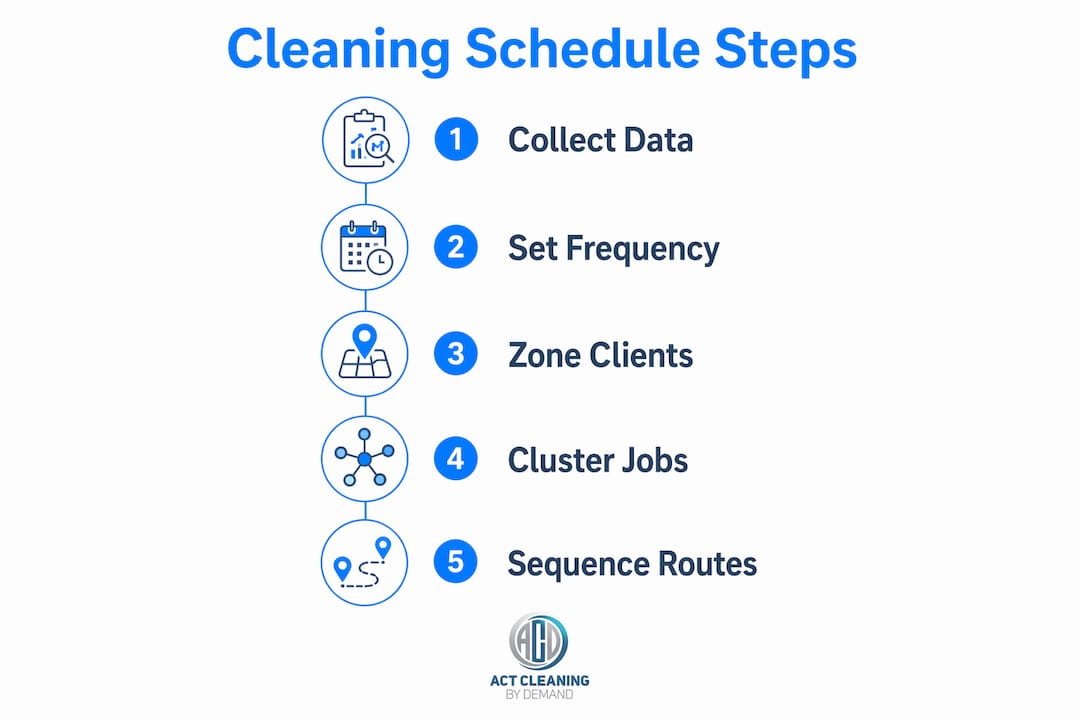
Within each zone, cluster appointments that sit within 10 to 15 minutes of each other and sequence them to follow a logical geographic path. Think of it as drawing a line on a map rather than zigzagging across suburbs. Route optimisation software can cut fuel costs by 20 to 30%, reduce overtime, and allow one to three additional jobs per crew day when clustering and sequencing are automated rather than done manually.
| Scheduling approach | Average drive time between jobs | Additional jobs per crew day |
|---|---|---|
| Ad hoc (no zoning) | 20 to 40 minutes | Baseline |
| Zone-based with manual routing | 10 to 20 minutes | 1 additional job |
| Zone-based with route optimisation | 5 to 15 minutes | 1 to 3 additional jobs |
Pro Tip: Build your zone map before you reach 15 clients. Retrofitting geographic zones onto an established schedule is painful. Starting early means every new client naturally slots into a zone that already works.
What scheduling practices reduce no-shows and late arrivals?
Reliability is the single most valuable thing a cleaning business sells. Clients do not just pay for a clean house or office. They pay for the certainty that someone will show up on time, every time. Three operational practices protect that reliability more than any other.
Buffer times of 10 to 15 minutes between appointments absorb travel variance, setup time, and unexpected issues without cascading delays into the rest of the day. Padding job duration estimates by approximately 15 minutes is equally important. A job estimated at 90 minutes should be scheduled as 105 minutes. Underestimating duration is the most common cause of late arrivals, and late arrivals compound across the entire day's route.
Scheduling staff at least one to two weeks in advance gives cleaners enough notice to manage their availability and gives you enough lead time to fill gaps before they become problems. Recurring templates form the baseline, adjusted weekly for one-off requests, cleaner availability changes, and client modifications. This rhythm also allows you to spot overloaded routes before they occur.
Automated reminders sent 48 hours and 2 hours before visits eliminate most no-shows. Clients forget appointments. A two-touch reminder sequence resolves this without any manual effort on your part. Pair this with a cancellation policy requiring at least 24 hours notice and an associated fee to discourage last-minute cancellations. Maintain a fill waitlist of clients who are happy to take short-notice appointments to plug gaps quickly.
- Insert 10 to 15 minute buffers between every appointment
- Pad all job duration estimates by approximately 15 minutes
- Build schedules one to two weeks in advance using recurring templates as the baseline
- Send automated reminders at 48 hours and 2 hours before each visit
- Enforce a 24-hour cancellation policy with fees and maintain a fill waitlist for last-minute openings
Pro Tip: Keep your fill waitlist as a live segment in your scheduling software, not a separate spreadsheet. When a cancellation comes in, you want to send one message to three people, not hunt through notes to find who said they were flexible.
Which software features matter most for cleaning business scheduling?
Scheduling software for a cleaning business is not just a digital calendar. The features that actually move the needle on efficiency are specific, and knowing which ones to prioritise saves you from paying for platforms that look impressive but do not solve your core problems.
Recurring visit series management is the non-negotiable starting point. The software must generate forward-looking appointment drafts based on frequency rules, not require manual entry for each visit. Without this, you are rebuilding your schedule from scratch every week. Managing recurring clients as isolated visits rather than frequency rules is the largest scheduling error cleaning businesses make, and it is entirely a software selection problem.
Route optimisation is the second critical feature. Look for systems that cluster jobs geographically and sequence them automatically. Manual route planning works at five clients. At 25 clients across three crews, it becomes a daily time sink that produces inferior results compared to algorithmic sequencing.
The remaining features that separate good platforms from average ones include:
- Automated client confirmations and reminders tied to appointment status
- Mobile access and GPS clock-in for cleaner accountability in the field
- Automated invoicing triggered by job completion with stored payment methods, which reduces the complexity of recurring invoicing significantly
- Integration of client details, cadence, scope, access notes, and billing into a single record
For managing multiple crews across different zones, the platform also needs clear crew assignment views and the ability to reassign jobs quickly when a cleaner calls in sick. Resources on managing multiple cleaning crews highlight that visibility across all crews in one screen is what separates reactive managers from proactive ones.
What mistakes break a cleaning business timetable?
Most scheduling failures in cleaning businesses are not random. They follow predictable patterns, and recognising them early saves significant time and client relationships.
"The schedule you build reflects the assumptions you make. Wrong assumptions about travel time, job duration, or client behaviour do not stay hidden. They show up as late arrivals, overworked cleaners, and churned clients." — Operational insight from the cleaning services industry
The six most damaging mistakes are:
- Treating each visit as a one-off instead of part of a recurring frequency rule. This causes schedule drift and breaks down with every holiday or reschedule.
- Ignoring geographic zoning and booking clients based purely on their preferred day. The result is crews zigzagging across the city, burning fuel and time.
- Underestimating job durations without padding for setup, transition, and unexpected delays. One underestimated job cascades into a late afternoon for the entire crew.
- Poor communication of schedule changes to cleaning teams. If a client reschedules and the cleaner is not notified immediately, the job either does not happen or happens at the wrong time.
- Overloading routes with no buffer between appointments. A single traffic delay or extended job becomes a full-day problem.
- Using multiple systems such as a spreadsheet for clients, a group chat for assignments, and a separate calendar for bookings. Conflicting data across systems is a direct cause of missed appointments and billing errors.
Fixing these mistakes does not require expensive software. It requires discipline in setup and a commitment to one system that everyone uses consistently. For recurring residential cleaning, the same principles apply regardless of whether you are running two cleaners or twenty.
Key takeaways
A well-structured cleaning business schedule built on frequency rules, geographic zones, and automated reminders is the operational foundation that separates profitable cleaning businesses from ones that stay permanently reactive.
| Point | Details |
|---|---|
| Use frequency rules, not fixed dates | Anchor biweekly schedules to a start date to prevent drift and maintain consistency. |
| Zone your service area by weekday | Geographic zoning cuts drive time from 40 minutes to under 15 minutes between jobs. |
| Build in buffer time every day | Padding job estimates by 15 minutes and adding 10 to 15 minute transitions prevents cascading delays. |
| Automate reminders and invoicing | Two-touch reminder sequences at 48 hours and 2 hours before visits eliminate most no-shows. |
| Centralise all data in one system | A single source of truth for client details, cadence, and billing prevents conflicting schedules. |
What I have learned from watching cleaning schedules succeed and fail
The businesses I have seen struggle most with scheduling share one trait: they optimise for client convenience at the expense of operational logic. They book clients on whatever day the client requests, skip geographic zoning because it feels inflexible, and end up with crews driving 45 minutes between jobs in the same suburb. The irony is that this approach does not even serve clients well. Overextended crews arrive late, rush jobs, and burn out faster.
The businesses that run well treat their schedule as a product. They design it deliberately, explain their zone days to new clients as a feature rather than a limitation, and use the time savings to deliver better service within each appointment. Geographic zoning, even for a two-person operation, is worth the initial awkwardness of telling a client their preferred day is not available in their area.
Buffer times are where I see the most resistance. Owners worry that padding estimates makes them look slow or expensive. The opposite is true. A business that consistently arrives on time and finishes when expected builds a reputation that justifies premium pricing. One that regularly runs late, regardless of the reason, loses clients to whoever shows up reliably.
The fill waitlist is the most underused tool in cleaning business scheduling. Every business has clients who would take a Tuesday afternoon slot on short notice. Capturing that preference at onboarding and keeping it live in your system turns a cancellation from a revenue loss into a same-day recovery. It takes ten minutes to set up and pays for itself the first time you use it.
— Deng
How ACT Cleaning by Demand supports reliable, recurring service
ACT Cleaning by Demand applies the same scheduling principles covered in this article to every client relationship, from weekly office cleans to one-off end-of-lease jobs. If you are a business owner or property manager who needs a cleaning service that shows up on time, follows a consistent scope, and communicates proactively, the team at Com is built for exactly that. Explore the office cleaning service for recurring commercial appointments, or review the end of lease cleaning options if you need a reliable, one-time deep clean with a fixed scope and confirmed timing. Both services are backed by a booking process designed to remove the scheduling friction that frustrates most clients.
FAQ
What is the best way to set up a recurring cleaning schedule?
Set frequency rules (every 7, 14, or 30 days from a confirmed start date) rather than booking fixed calendar dates. Auto-generate visit series 6 to 12 months forward so appointments appear without manual entry each week.
How do I reduce no-shows in my cleaning business?
Send automated reminders at 48 hours and 2 hours before each appointment, and enforce a cancellation policy requiring at least 24 hours notice with an associated fee. Maintain a fill waitlist to recover revenue from last-minute gaps.
How does geographic zoning improve cleaning crew efficiency?
Assigning each suburb zone to a specific weekday and clustering jobs within 10 to 15 minutes of each other reduces drive time from 20 to 40 minutes down to 5 to 15 minutes, freeing capacity for one to three additional jobs per crew per day.
How far in advance should I schedule my cleaning staff?
Schedule at least one to two weeks in advance using recurring templates as the baseline. This gives cleaners adequate notice and gives you time to fill gaps before they affect client service.
What is a single source of truth in cleaning business scheduling?
A single source of truth is one system that holds all client details, service cadence, access information, cleaner assignments, and billing data. Running this information across multiple tools such as spreadsheets, group chats, and separate calendars causes conflicting schedules and missed appointments.