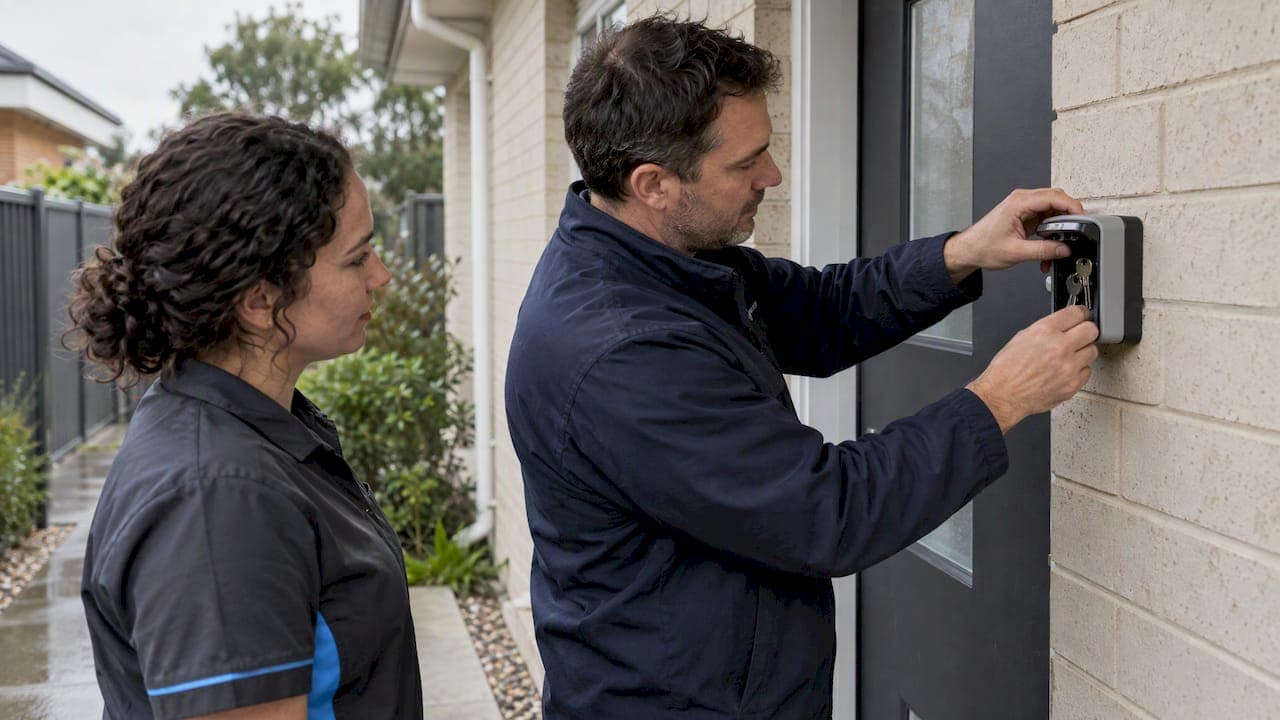
Give your cleaner a named, revocable credential on an offline-capable smart lock. That is a practical way to handle airbnb cleaner access. If the door can't be changed, use a securely mounted lockbox with written entry steps. Either way, test the access log and your backup entry before the first turnover.
TL;DR:
- A lockbox suits buildings that prohibit door changes and works without a network, but shared codes make it harder to identify who entered.
- Keep guest and cleaner credentials separate, let booking codes expire automatically, and remove cleaner codes when staff change or an audit finds them unused.
- Check active codes monthly, review entry logs after each turnover, and rekey mechanical locks after staff changes or when keys cannot be accounted for.
- If remote unlocking fails, give the cleaner a controlled backup key and a local responder, and specify whom to call and where to wait safely.
Table of Contents
- Which methods work for giving a cleaner physical access?
- How do you set up cleaner access step by step?
- What security practices keep the property safe?
- What do you do when cleaner access fails?
- Why reliability beats convenience for cleaner access
- How we manage access and turnovers for you
- FAQ
- Sources
Which methods work for giving a cleaner physical access?
You have several realistic options, and the right one depends on the door, the building and how often guests turn over.
- Smart lock with a named cleaner credential: A dedicated code for your cleaner sits alongside automatic per-booking guest codes. Choose a model with local keypad entry and an access log, as offline-capable entry means a dropped connection doesn't strand anyone on the doorstep.
- Lockbox or key safe: This suits rentals where you can't alter the door, and it works without Wi-Fi. The staytap host guide notes lockboxes are cheap and fit buildings where door changes aren't allowed. The trade-off is that a shared code is harder to attribute to one person.
- In-person handover or building staff: If the property has a concierge, staff can let your cleaner in. Scheduling gets tighter, because the cleaner must arrive when someone is on duty.
- Temporary physical keys: These work for low-turnover homes or properties you manage on site, but keys can go missing without anyone noticing.
Airbnb itself lists these check-in methods and lets you edit your instructions in the listing editor, so match the method to the listing.
How do you set up cleaner access step by step?
You can work through this setup at a pace that suits you. Work through it in order.
- Pick your primary method and write down why. Smart lock or lockbox, with one line explaining the choice, so a co-host understands it later.
- Create a named cleaner credential. Label it clearly, for example "Cleaner, Tuesday crew". Platforms such as Guestway support manual named codes for recurring staff, while guest codes can run automatically and expire.
- Test offline entry. Switch off the router or put your phone in flight mode, then confirm the keypad still opens the door.
- Document the exact entry steps. Include the door, the building entry, any buzzer action, parking and the alarm code if there is one.
- Say where evidence of completion goes. A photo set or a signed checklist works. Our Airbnb cleaning checklist gives you a ready-made structure to adapt.
- Set rotation and retirement rules. Decide how often cleaner codes change and who removes one when a cleaner leaves.
- Schedule periodic audits. A monthly check of active codes is enough for most hosts.
- Brief your cleaner. Walk them through arrival, what to do if the door won't open, and the reporting requirement.
Pro Tip: Do a walk-through with your cleaner on site and make them open the door themselves. A code that works for you but fails for them is a setup problem worth catching early.
Scheduling matters here too. Our post on flexible cleaning schedules covers how to build arrival windows that fit your guest checkout times. Operators who run tight weekend changeovers face the same pressure, as Serava's note on changeover days shows, and a fixed arrival window with a clear access method is what keeps those days from unravelling.

What security practices keep the property safe?
A credential is only as safe as the habits around it. These practices can help reduce access problems.
- Read the access log after each turnover. Logs record when a door was unlocked and by which credential. Access logs give transparency and are often the most effective tool for settling arguments about arrival times or whether a cleaner attended.
- Keep a property-specific access plan. Separate permissions for guests, cleaners and owners, and write down who issues codes and who checks the door after checkout. The Call Home Help access plan recommends recording who verifies the door after checkout.
- Audit and retire stale codes. A code nobody has used for months is a liability, so remove it.
- Rekey when keys are unaccounted for. For mechanical locks, rekeying after long stays or staff changes is a cost-effective fix.
- Close the weak points around the door. Sash jammers, patio door locks and window restrictors secure points that are easy to overlook after a clean.
- Check strata and building rules first. Get approval before altering an external door or adding hardware.
Digital-first access can reduce the risk of unrecovered physical keys being used by former guests or unauthorised people. In a short-stay property with frequent turnover, that is a reason to consider moving away from loose keys.
What do you do when cleaner access fails?
Plan for failure before it happens, because a locked-out cleaner during a turnover can put a timely check-in at risk.
- Treat offline code entry as non-negotiable. If the connection drops, a local keypad code still works. Test it before relying on the lock to reduce the risk of lockouts.
- Keep one controlled backup key. Record where it lives and write an emergency-use rule, as the access plan guidance advises when it says not to rely solely on remote unlocking from your phone.
- Name a local responder. A co-host, neighbour or contractor who can attend within a predictable window turns a crisis into a delay.
- Tell the cleaner what to do. Call the host contact, photograph the locked door, and wait somewhere safe.
- Know how your integrations behave. If your lock connects to Airbnb, codes for upcoming bookings are generated and shared automatically, but they are not changed for guests already in residence. Property management systems can also deliver door codes through Airbnb, yet you must still supply backup entry instructions.
Why reliability beats convenience for cleaner access
I lean towards offline-capable smart locks for any property with frequent turnover, and a well-placed lockbox where the building won't allow door changes. Both have costs: a good lock is an upfront expense, and strata rules can limit what you install. Whichever you choose, prioritise an access log, a documented backup, and a written access plan for each property. Review access after any staff change or long-term guest, because that is when forgotten codes pile up.
— Deng
How we manage access and turnovers for you
If you'd rather not run this yourself, we handle short-stay turnovers with staff and flexible scheduling. Our Airbnb cleaning service works around your access method.
- We agree arrival windows that suit your checkout times
- We follow your written entry instructions and document completion
- We can adapt to your lock, lockbox or building arrangement
Browse our full list of cleaning services to book or request tailored access arrangements.
FAQ
What is the safest way to give a cleaner access?
A named, revocable code on an offline-capable smart lock is a practical option. It lets you remove one person without changing anything else, and the access log shows when they entered. Where the door can't be changed, a lockbox with a code you rotate is another option.
Should a cleaner use the same code as guests?
No. Give your cleaner their own named credential. A per-booking guest code that expires at checkout removes key handover, and a separate cleaner code means the log shows exactly who entered.
What happens if the lock loses Wi-Fi?
A lock with local keypad entry keeps working. If your lock depends only on the network, your cleaner may be locked out, so test offline entry before relying on it. Keep a documented physical backup as well.
How often should cleaner codes change?
Change or retire a code whenever your cleaner changes, and audit active codes on a regular schedule. Remove any code that hasn't been used for months. The exact interval is your call, but the rule should be written down.